
Ticketing companies and promoters
Concert, festival and theatre on-sales and flash sales: fans get in fairly, in order of arrival, and your ticketing system receives buyers at the pace you set.
Virtual waiting room for high-demand sales
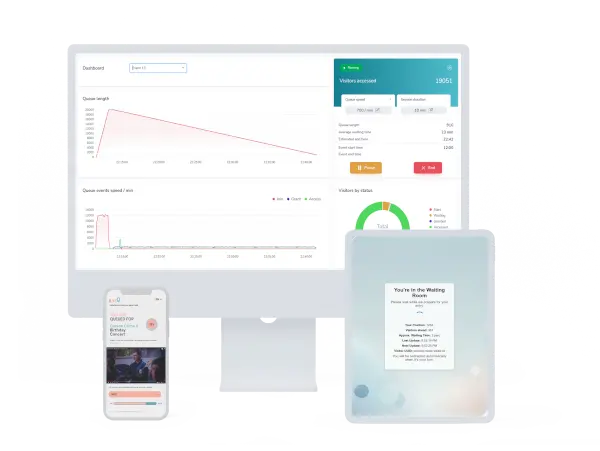
When tickets go on sale, season passes open or a timed promotion starts, ILoveQ lines your visitors up and lets them through at the rate you choose. While they wait, they see their place in line and the estimated wait on a branded waiting room on your own domain.
Who it is for
Concert, festival and theatre on-sales and flash sales: fans get in fairly, in order of arrival, and your ticketing system receives buyers at the pace you set.
Season-ticket renewals, derbies and cup finals: supporters move on in the order they arrived, while your club site and ticket shop get traffic at a manageable rate.
Black Friday, limited drops and timed promotions: shoppers wait in a branded waiting room while your cart and checkout receive traffic at the rate you choose.
Features
The essentials for a calm sale day, with controls for scheduling, steering and reviewing each event.
A fully customisable waiting room template that matches your brand and runs on your own domain, at no extra cost.
Visitors move on in the order they arrived, and they can see their position and estimated wait the whole time.
Let specific IPs and ranges, such as payment provider callbacks or your own networks, bypass the queue.
You decide how many visitors per minute are let through to your site.
Run several events at once and protect different parts of your site, such as /tickets/ or /sale/, each with its own queue.
The waiting room speaks your visitors’ language, for local and international audiences alike.
A live dashboard of queue length, admissions and waiting times throughout the event.
Open the waiting room before the sale starts. Early arrivals see a countdown until the sale goes live.
Backend struggling or stock sold out? Stop admissions with one click and resume just as easily.
Change the admission rate during the event, down to as low as 1 visitor per minute.
Set how long an admitted visitor’s session stays valid.
Receive a PDF summary report with the data of every event once it ends.
Infrastructure pre-scaled before every scheduled event, so the waiting room is ready when the sale opens.
Tell us what would make ILoveQ work better for your sales. We read every suggestion.
Fine-grained control
With small presale allocations, limited stock or a fragile backend, slow and precise admission is what counts. ILoveQ lets you set any rate from 1 visitor per minute upwards, and change it live during the event.
How it works
A lightweight script at the edge of your site decides who goes through, and everything else runs in the ILoveQ cloud.
Your edge account
A small script runs at the edge of your site, in your own edge account. On every request it decides whether the visitor goes straight through or into the waiting room.
No changes to your hosting or your shop. Admitted visitors reach your website just as before, at the pace you set.
Queue management, the waiting room, the dashboard and the reports run in the ILoveQ cloud, on servers hosted in the EU (other regions available on request). There is nothing for you to operate.
In production
According to Backstage Ticketing, the ILoveQ virtual waiting room debuted during the flash sale campaign announcing the 2026 SZIN festival:
Visitors always knew the exact number of people ahead of them and their remaining waiting time, while the backend gave the organisers all relevant data in real time.
Why ILoveQ
Transparent pricing, your branding and your own domain included in the base price, and servers hosted in the EU.

Your branded waiting room on your own domain is part of the base price.

The base fee and every event unit are listed below, so the cost of an on-sale or promotion is easy to plan.

First in, first out, with position and estimated wait shown to every visitor.
Pricing
Scalable infrastructure for high-demand ticket sales and peak traffic.
Monthly core infrastructure
€500/mo
Monthly event credits
Your base fee includes either:
Event size is the total number of visitors over the whole event, not the number on your site at the same time.
Contact us* The base fee is billed monthly, with no minimum contract term. Included event credits do not roll over. Event sizes refer to the total number of visitors per event. Additional event units are billed according to the event size booked in advance, based on the visitor numbers you expect, even if fewer visitors arrive. Any traffic beyond the booked size is settled after the event. Prices exclude VAT.
If your domain isn’t there yet, we can help you plan and carry out the move, so the waiting room is ready for your next sale. Every setup is different, so we’d like to learn more about yours first.
Custom pricing
Let’s talkFAQ
Today the integration requires your domain to be on Cloudflare. A lightweight edge worker runs in your own account; queue management and the waiting room run in the ILoveQ cloud.
ILoveQ’s servers are hosted in the EU. On request, the infrastructure can also be deployed in other regions. The edge worker in your own account runs on your edge provider’s network.
Yes. Several events can run in parallel, and with path-based routing (for example /tickets/ and /season-passes/) each one gets its own queue.
In your own account you can add your edge provider’s bot challenge in front of the waiting room entry. This filters out simpler automated traffic.
You decide: the session length of admitted visitors is configurable.
Event sizes are based on the total number of visitors over the whole event, not on how many are on your site at the same time. Before each event you tell us how many visitors you expect; we use this to book the event size and to pre-scale our infrastructure with extra headroom. If fewer visitors arrive, the booked size is billed; if more arrive, the difference is settled after the event.
No. The base fee is billed monthly, so the shortest commitment is a single month, and you can cancel at any time.
Before every scheduled event we scale up ILoveQ’s own infrastructure, with headroom, based on the visitor numbers you expect, so the waiting room is ready for incoming traffic the moment your sale opens.
Write to us and we will show you how ILoveQ fits your site and your next event.
Email us: info@iloveq.io